Webhooks
Webhooks allow you to receive real-time notifications when events occur in SanctionsWise. Instead of polling for sanctions list updates, your application receives HTTP callbacks automatically.
Overview
When an event occurs (like a sanctions list update), SanctionsWise sends an HTTP POST request to your specified URL with details about the event.
Availability by Tier
| Tier | Webhook Limit |
|---|---|
| Free | Not available |
| Starter | 1 webhook |
| Professional | 5 webhooks |
| Enterprise | Unlimited |
If you're on the Free tier, upgrade your subscription to enable webhooks.
Creating a Webhook
Step 1: Navigate to Webhooks
- Log in to your dashboard
- Select SanctionsWise from the product selector
- Click Webhooks in the navigation menu
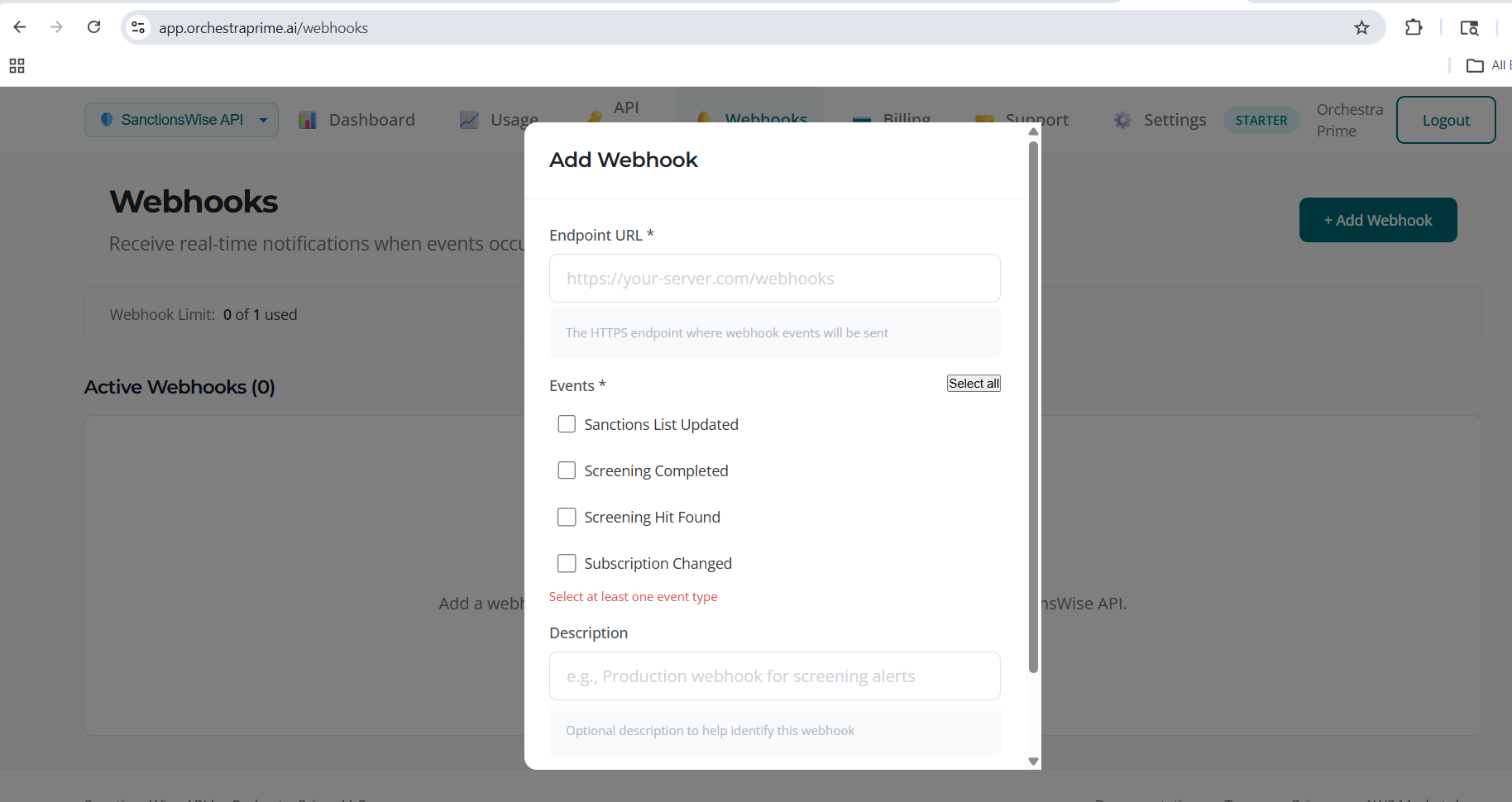
Step 2: Add New Webhook
- Click Add Webhook
- Fill in the configuration:
| Field | Required | Description |
|---|---|---|
| URL | Yes | Your HTTPS endpoint URL |
| Events | Yes | Which events to subscribe to |
| Description | No | A label to identify this webhook |
- Click Create Webhook
Step 3: Save Your Secret
Important: When the webhook is created, you'll see a webhook secret. This is shown only once.
- Copy the secret immediately
- Store it securely
- Use it to verify webhook signatures
Example secret format:
whsec_abc123def456...
Event Types
| Event | Description |
|---|---|
list.updated | A sanctions list has been updated |
list.sync.completed | A list sync has completed |
list.sync.failed | A list sync failed |
entity.added | New entity added to a list |
entity.removed | Entity removed from a list |
entity.modified | Entity details modified |
Webhook Payload
When an event occurs, SanctionsWise sends a POST request with this structure:
{
  "id": "evt_abc123",
  "type": "list.updated",
  "created": "2026-01-23T10:30:00Z",
  "data": {
    "list_id": "ofac_sdn",
    "list_name": "OFAC SDN List",
    "entities_added": 15,
    "entities_modified": 3,
    "entities_removed": 1,
    "sync_id": "sync_xyz789"
  }
}
Example: Entity Added Event
{
  "id": "evt_def456",
  "type": "entity.added",
  "created": "2026-01-23T10:30:00Z",
  "data": {
    "list_id": "ofac_sdn",
    "entity_id": "ofac-sdn-99999",
    "name": "NEW SANCTIONED ENTITY",
    "entity_type": "organization",
    "programs": ["SDGT"]
  }
}
Headers
| Header | Description |
|---|---|
Content-Type | application/json |
X-OrchestraPrime-Signature | HMAC signature for verification |
X-OrchestraPrime-Event | Event type |
X-OrchestraPrime-Delivery-Id | Unique delivery ID |
Verifying Webhook Signatures
Always verify webhook signatures to ensure requests are from SanctionsWise.
Python Example
import hmac
import hashlib

def verify_webhook(payload: bytes, signature: str, secret: str) -> bool:
    """Verify webhook signature."""
    expected = hmac.new(
        secret.encode(),
        payload,
        hashlib.sha256
    ).hexdigest()

    # Signature format: sha256=HEXDIGEST
    received = signature.replace("sha256=", "")
    return hmac.compare_digest(expected, received)

# Usage in your webhook handler
@app.post("/webhook")
def handle_webhook(request):
    payload = request.body
    signature = request.headers.get("X-OrchestraPrime-Signature")

    if not verify_webhook(payload, signature, WEBHOOK_SECRET):
        return {"error": "Invalid signature"}, 401

    event = json.loads(payload)

    # Handle list updates
    if event["type"] == "list.updated":
        # Trigger re-screening of affected entities
        rescreen_affected_entities(event["data"]["list_id"])

    return {"received": True}, 200
Node.js Example
const crypto = require('crypto');

function verifyWebhook(payload, signature, secret) {
  const expected = crypto
    .createHmac('sha256', secret)
    .update(payload)
    .digest('hex');

  const received = signature.replace('sha256=', '');
  return crypto.timingSafeEqual(
    Buffer.from(expected),
    Buffer.from(received)
  );
}
Use Case: Re-Screening on List Updates
A common use case is to automatically re-screen your customer database when sanctions lists are updated:
def handle_list_update(event):
    """Re-screen customers when a list is updated."""
    list_id = event["data"]["list_id"]

    # Get customers that had hits on this list
    affected_customers = get_customers_with_list_hits(list_id)

    for customer in affected_customers:
        # Re-screen against updated list
        result = screen_entity(
            name=customer.name,
            entity_type=customer.type
        )

        if result.status == "clear":
            # Previously matched, now clear
            notify_compliance_team(customer, "resolved")
        elif result.score > customer.previous_score:
            # Match score increased
            notify_compliance_team(customer, "escalated")
Testing Webhooks
Send Test Event
- Navigate to Webhooks
- Find your webhook
- Click Test
- A test event will be sent to your endpoint
Test Payload
Test events have this structure:
{
  "id": "evt_test_123",
  "type": "test",
  "created": "2026-01-23T10:30:00Z",
  "data": {
    "message": "This is a test webhook"
  }
}
Using Request Bin
For development, use a service like webhook.site to inspect webhook payloads.
Viewing Delivery History
- Navigate to Webhooks
- Click History on a webhook
- View recent deliveries with:
- Timestamp
- Event type
- HTTP status code
- Response time
Delivery Statuses
| Status | Description |
|---|---|
| Delivered | Webhook received 2xx response |
| Failed | Webhook received non-2xx response |
| Pending | Delivery in progress |
| Retrying | Failed, retrying |
Retry Policy
Failed webhooks are retried with exponential backoff:
| Attempt | Delay |
|---|---|
| 1 | Immediate |
| 2 | 1 minute |
| 3 | 5 minutes |
| 4 | 30 minutes |
| 5 | 2 hours |
| 6 | 12 hours |
After 6 failed attempts, the delivery is marked as permanently failed.
Deleting a Webhook
- Navigate to Webhooks
- Find the webhook to delete
- Click Delete
- Confirm deletion
Warning: Deleting a webhook is permanent. You'll no longer receive notifications at that URL.
Best Practices
Endpoint Requirements
- Use HTTPS (HTTP is not supported)
- Respond within 30 seconds
- Return 2xx status code on success
- Handle duplicate deliveries (use delivery ID)
Security
- Always verify signatures - Reject requests with invalid signatures
- Use HTTPS - Never use HTTP endpoints
- Keep secrets secure - Store webhook secrets like passwords
- Log deliveries - Track received webhooks for debugging
Compliance Integration
- Re-screen on updates - Automatically re-screen when lists change
- Audit trail - Log all webhook events for compliance records
- Alert on additions - Notify compliance when new entities are added
Troubleshooting
Webhook Not Receiving Events
- Check the webhook is active (not deleted)
- Verify the URL is correct and accessible
- Check your server logs for incoming requests
- Review delivery history for errors
Signature Verification Failing
- Ensure you're using the correct secret
- Verify you're using the raw request body (not parsed JSON)
- Check the signature header name is correct
Timeout Errors
- Respond to webhooks within 30 seconds
- Process events asynchronously if needed
- Return 202 Accepted for long-running tasks